JuanseUnlock Launcher
The ultimate evolution. A native Launcher built from scratch to manager, optimize, and play Minecraft Bedrock (UWP and GDK). All in a single interface.




Main features
The version you install stays the one you picked: GDK versions with Pyroclastic mode and UWP versions in developer mode.
Switch to any version, newer or older, Release or Preview: it warns you, copies your worlds and puts it on.
Copies your worlds before every change, each copy with its date. Copying means copying: it never takes them out of the game.
Choose between default themes or select your own custom accent color.
Open your Mods, shaders, or root game folders directly with one click.
The whole app in Spanish, English and Portuguese, warnings and error messages included.
Patch notes · v1.2.2.1
What changed in each version, from newest to oldest.
What's new
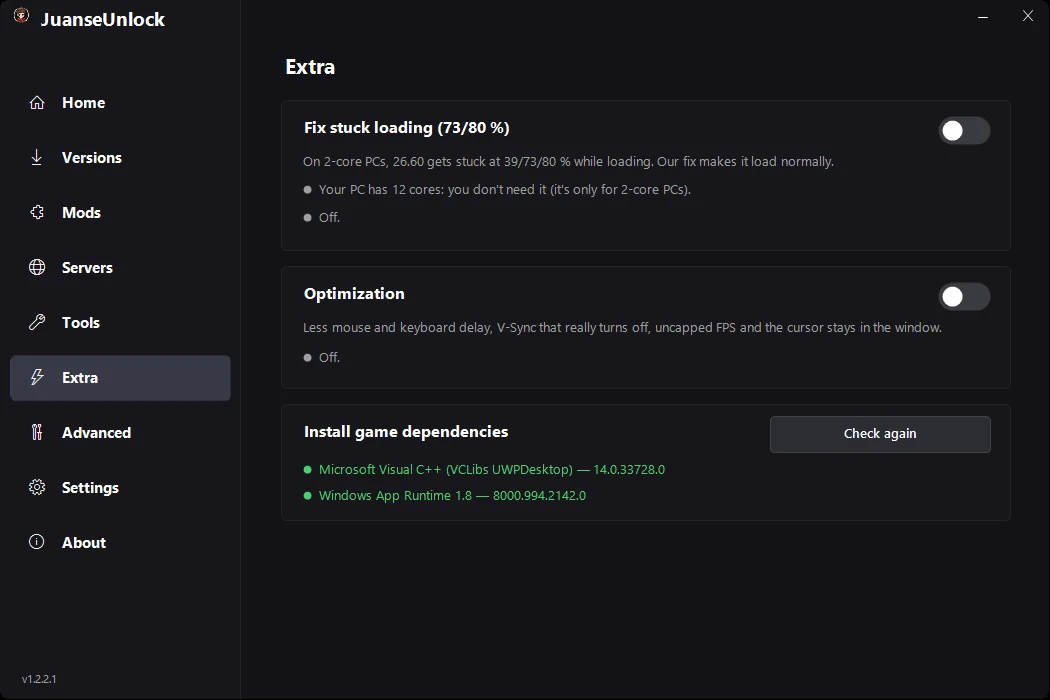
- New Extra tab, with “Fix stuck loading (73/80 %)”. On 2-core PCs, 26.60 gets stuck at 39, 73 or 80 % while loading: our fix makes it load normally. It comes turned off, and if your PC has 2 cores the launcher lets you know and asks you. Step by step in the guide Minecraft Bedrock stuck at 73%.
- “Optimization”, also in Extra, if you want it: less mouse and keyboard delay, V-Sync that really turns off, uncapped FPS and the cursor stays in the window.
- “Install game dependencies”: checks whether your Windows is missing what 26.60 needs (Microsoft Visual C++ and Windows App Runtime 1.8) and installs it.
- Worlds between PC and phone: adb now comes included, nothing else to install.
Bugs fixed
- Error 0x80073CF3 when installing a version. It showed up on PCs missing something Windows needs for the game. Now the launcher installs it by itself before every green (GDK) version, and if the error shows up again, the message sends you to Extra.
What's new
- New Mods tab. Soon you'll be able to install BP and RP packs and CurseForge add-ons for Bedrock from the launcher. In the meantime, you can import .mcpack, .mcaddon and .mcworld files from there in one click.
- Install, on Home, no longer goes through the Microsoft Store. It does the same as Versions: it asks you, copies your worlds, removes the version you have and puts on the one you picked, without it updating on its own. If Windows is missing Gaming Services, it installs that first.
- Gray (UWP) versions also install on modified Windows, like Mini OS.
- «Your Windows», in Tools. On a modified Windows it tells you what's missing and why the green versions can't be installed there.
- Servers and Settings, redesigned. Settings now comes in cards: appearance, language, game folders and privacy.
- Everything in Spanish, English and Portuguese, including the themes, the phone bridge messages and the Microsoft Store errors, which only showed up in Spanish.
Bugs fixed
- The gray (UWP) versions disappeared from the list. On October 21 the server that list came from went down (MCMrARM's launcher had the same problem). Now the launcher keeps a copy and has a backup list: every gray version up to 1.21.114 is there.
- On a modified Windows you got an error that had nothing to do with it. Now it explains what's missing.
- When the Microsoft Store couldn't install the game, it didn't say why. Now you see the real reason.
- If your Windows has no Microsoft account, it now tells you how to add one.
- The versions list didn't show all the way to the end, and «About» got a better layout.
- The app's log saved your Microsoft download link. It doesn't anymore.
What's new
- Switch versions, with a warning. Pick another version, newer or older: it warns you that the one you have gets uninstalled, copies your worlds and installs the one you picked. If you pick the one you already have, it offers to reinstall it.
- UWP versions don't update on their own either. The ones before 1.21.120 are installed in developer mode, like mc-w10-version-launcher does, so the Microsoft Store leaves them alone. For that Windows needs «Developer Mode» turned on: the launcher takes you to the setting and you turn it on.
- «Made possible by», in About. Credits to mc-w10-version-launcher by MCMrARM and Pyroclastic by Aetopia, without which this launcher would have been much harder. Each one opens its page.
- If you have 1.2.0, there's nothing to download: the launcher offers to install this version right there.
Bugs fixed
- With a version installed it wouldn't let you put another one on, newer or older: the Pyroclastic mode warning stopped the install.
- The game updated itself when opened. On a freshly installed GDK version, Pyroclastic mode wasn't applied. Now it always is, and the launcher checks that it stuck.
- «Allow updates» sent you to repair the game from the Xbox app. Now it just removes Pyroclastic.
- Installing a UWP version also uninstalled the Preview, without asking.
- After installing a UWP version, worlds from an old backup came back instead of the ones you had.
- UWP Preview worlds weren't included in the backup, and uninstalling it lost them.
- The download bar jumped halfway through.
- In Portuguese, the buttons of the warnings split into two lines.
What's new
- The whole app in Spanish, Portuguese and English. Before, some screens were half translated.
- New About tab, with your version and «Check for updates».
- Tools shows which startup mode is on: Pyroclastic or the normal one.
- Versions named the way Mojang does: 26.52, not 1.26.52.3.
- Refreshed interface: menu icons, buttons that light up on hover and text that no longer overflows.
Bugs fixed
- «Create backup» took the worlds out of the game instead of copying them, and deleted the previous backup. Now each backup goes to its own dated folder and none overwrites another.
- Cancelling a download didn't cancel it.
- PLAY showed a «Success» popup you had to close.
- Copy IP and Play, on the server card, did nothing.
- Uninstall said «complete» even when Windows couldn't do it.
- The progress bar froze if you switched tabs while installing.
- The folder buttons (mods, shaders, game root) opened an old folder or the launcher's own.
- Português couldn't be picked in Settings.
Installation and usage
Quick guide to install it correctly (video in Spanish).
Beta Status and Future Features
The Launcher is currently in Beta. phase. The core engine and installation work perfectly, but there are active features in development:
- Advanced Mode: Having several versions installed at the same time isn't ready yet. For now there's one Release and one Preview: when you switch versions, the one you have is uninstalled (your worlds are copied first).
- Mods: Installing BP and RP packs and CurseForge add-ons from the launcher is on its way. In the meantime, the Mods tab already imports .mcpack, .mcaddon and .mcworld files.
- PC-android Bridge: The USB device Scanner is currently Simulated and will be enabled soon
- World Scanner: Pending integration upcoming updates.
Keep going with these guides
Download JuanseUnlock Launcher
Only official and completely safe version.
Security Analysis of version 1.2.2.1